Home of real teaching & learning
  • Full support for teachers
  • Focus on critical thinking
  • Engaging classroom activities
  • Integrated student eBook
  • Assessed tasks / qBank
  • Practice exam questions

The InThinking Guarantee: Our sites are written by expert practitioners and not by AI

See our AI policy

Disclaimer: InThinking subject sites are neither endorsed by nor connected with the International Baccalaureate Organisation.

Don't miss out, find out!

Topic pathways & tracking progress

Planning and record keeping will be more important than ever from September 2023 as there is a seemingly infinite choice of pathways through the forty topics. To complicate matters further the topics contain different proportions of core SL  content and additional HL material. Some have only HL material, and others only SL material.

This Excel sheet will help with both planning and record keeping of the DP Biology course. It could form part of a course outline, it might incorporate a list of experiments which from the practical scheme of work and it will be a great record of the actual time taken teaching each topic, the challenges and successes of the pathway chosen with this first cohort.

It includes the IA and the Collaborative Sciences Project in the two years outline. To allow for SL classes, Mixed SL & HL classes and separate HL classes there are separate sheets for SL and HL and of course the HL sheet has all the details of SL so that it can be used to plan the delivery of a DP Biology course in a mixed SL / HL group.

The IB Biology Roadmap planner

You can download a copy of the ThinkIB DP Biology Excel Topic planner or you can preview the file here:
Topic Sequences

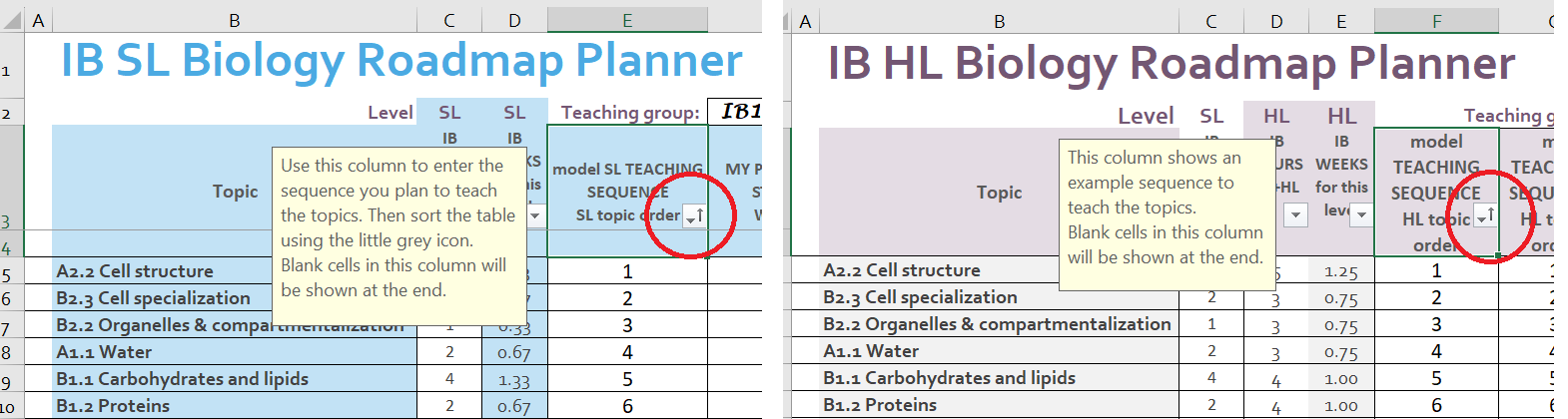
For anyone who hasn't time to plan a personalised sequence of topics there is a suggested teaching sequence for SL and for HL. Simply click the SL Planner tab, or the HL Planner tab, and sort the sheet using the filter button in the column labelled "model teaching sequence".  The filter button is circled in red in the image below. Choose to option "Sort smallest to largest".
This transforms the topic sequence from alphabetical by topic code, A1.1, A1.2 etc.  to a reasonable teaching sequence. The sequence begins with cells and molecules and then moves on to genetics, ecology, evolution and the human body. It's OK as a start and there is nothing stopping creativity later in the two year topic pathway.

Hours and calendar weeks

The DP Biology guide teaching times for each topic are visible in the Excel sheet. This is important information for planning but hours are difficult to imagine when planning in months or terms of teaching, so the third column converts the guide hours into teaching weeks. The thought of teaching a topic in two weeks, is easier to manage in a planner.
Personalise the sheet by entering the actual number of teaching hours your class has in a week into the "hours per week" cell. 
Plan a sequence of topics. Simply decide on the order and enter a number into the 'My Teaching sequence" column.
Use the teaching time estimates to work out the week number when you expect to begin teaching each topic.
Enter this into the column "PLANNED START WEEK"
Highlight today's actual school calendar week, by entering your week number in the "Wk" cell in row 2.
The sixty calendar week cells will then show a coloured block representing the timing and length of each topic.
This will be helpful in working out the starting week of the topics later in the course and whether there will be enough time to teach all the topics.
There are a couple of extra, blank topics in case you would like to plan for mock exams or a field trip, etc..
This graphic summarises these points.
It's enough to plan a few weeks to begin with. Think of your aims at the start of the DP Biology course, perhaps focus on teaching students some lab skills, so choose topics allowing more practical work. Is there something your students will already know so building on this might be a nice beginnig. Perhaps an Inquiry question, "Can we really work out the function of a cell by looking at it's shape and structure?".
This makes the planning task less of a headache. It gives flexibility to respond to student interest or to follow a linking question to the next topic. This is one of the big changes in the DP Biology guide for exams from 2025, It provides opportunities to link topics by theme, or concept and to try to connect the learning.
Pragmatically, towards the end of the course, once most topics have been covered, we will be wanting to complete all the remaining topics without missing anything out.  This taks will be easier, because all the remainng topics will be listed in the lower rows of the spreadsheet. The filter button, "Sort smallest to largest'  will take care of that.

Notes for reflections, reminders of skills covered, or the practical scheme of work - PSOW

The notes column can have several uses. It could record reminders for next year's planning, perhaps it would have been better to teach topic A1.1 Water before B2.1 Membranes and membrane transport so we can note this without changing the topic sequence this year. Why not also record details of practical work carried out by students for the PSOW? There are many skills that need covering within the guide and recording them as we cover them could be useful.
Reflecting on what happened during out teaching this year is the first stage of planning for next year. Together with the "Actual time taken" column these notes will be useful in planning the sequence for the next cohort.

Hidden topic information

Although the Excel sheet looks like it contains just the titles of the topics each of the "Topic title" cells contains more information. Details of the theme and the level of organisation as well as one guiding question are also in this cell, visible if the cell is clicked, or the rows made taller.

Hacking the spreadsheet

None of the cells in the Excel sheets have been protected, so it is perfectly possible to change the layout or the contents of the sheets to make this planner work your way. There have already been several versions of this spreadsheet, and the sheet has evolved into the one shared on this page after testing and reviem.

However, there are plenty of options for improvement, for example:

More space for notes may be really important in one department.

The visual calendar weeks graphic may not be so useful in another.

Multiple columns for the teaching sequences of several classes might be a better approach if you teach four groups.

A special column for PSOW and separate records for Skills, and the teaching reflections might be essential to you.

All these ideas are possible and easy to add to the sheet.


Tags: All

All materials on this website are for the exclusive use of teachers and students at subscribing schools for the period of their subscription. Any unauthorised copying or posting of materials on other websites is an infringement of our copyright and could result in your account being blocked and legal action being taken against you.

Help