Songscription - AI Tools for Educators
AI Transcription and More
Songscription is an AI transcription platform that turns audio or video into sheet music, MIDI, tabs, or MusicXML. It accepts audio, video, YouTube/Instagram/TikTok links, browser recordings, and MIDI or MusicXML imports. For Exploring Music in Context, this may assist students who work better from a score; for Experimenting with Music, it may inspire ideas for the reworking of stimuli as multiple layers are more easily identifiable; and for Presenting Music, it can be useful for programme notes.
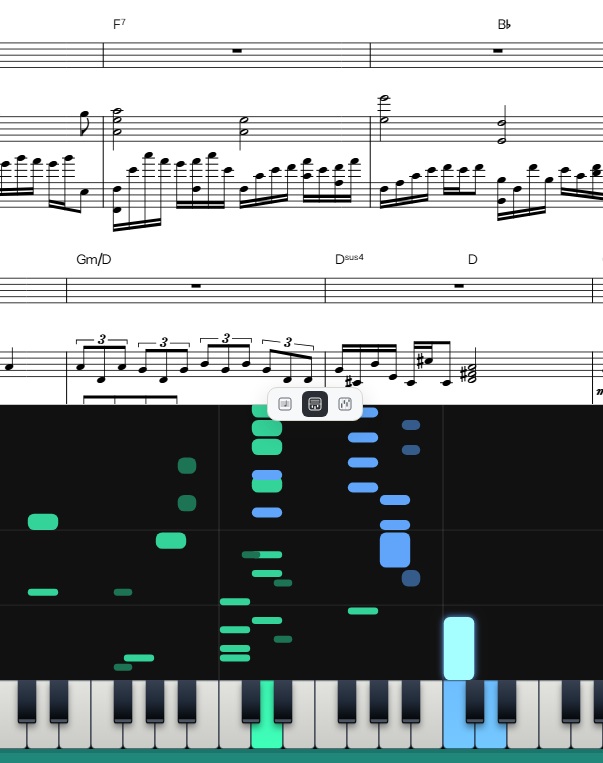
“Screenshot” from Songscription
In addition to the formats mentioned above, Songscription also includes an interactive piano roll (see below), which can help students who prefer a visual representation of the music as it unfolds. It accepts audio files, in the form of MP3, WAV, FLAC, AAC, M4A, video files, as MP4, MOV, WebM, as well as the other forms mentioned above.
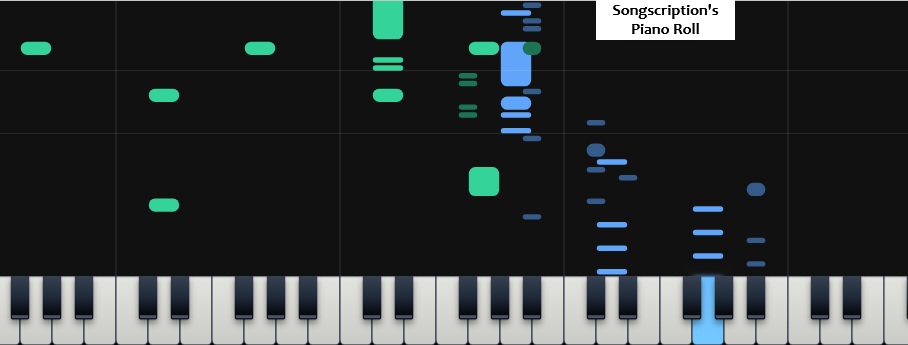
Its main features are:
- Single-instrument transcription for piano, guitar, bass, double bass, violin, flute, trumpet, saxophone, drums, and vocals.
- Multi-Instrument transcription, which separates a full-band recording into individual parts across keys, guitars, bass, strings, brass, woodwinds, saxophones, synths, voice, and drums, with keyboard parts split into left and right hands.
- Piano covers at five difficulty levels (Adaptive, Beginner-Intermediate, Intermediate, Intermediate-Advanced, Advanced), regenerable in about 30 seconds.
- Automatic piano finger numbers (1-5), shown on both the piano roll and the score.
- Chord detection, with symbols written above the score in time with playback.
- An interactive piano roll showing each note as a bar above its key, with optional finger numbers and adjustable playback speed.
- Annie, an AI editor that makes changes in plain language, including transposing, fixing notes, changing key or time signature, adding dynamics, articulations, lyrics, or repeats.
- A public sharing link for every transcription.
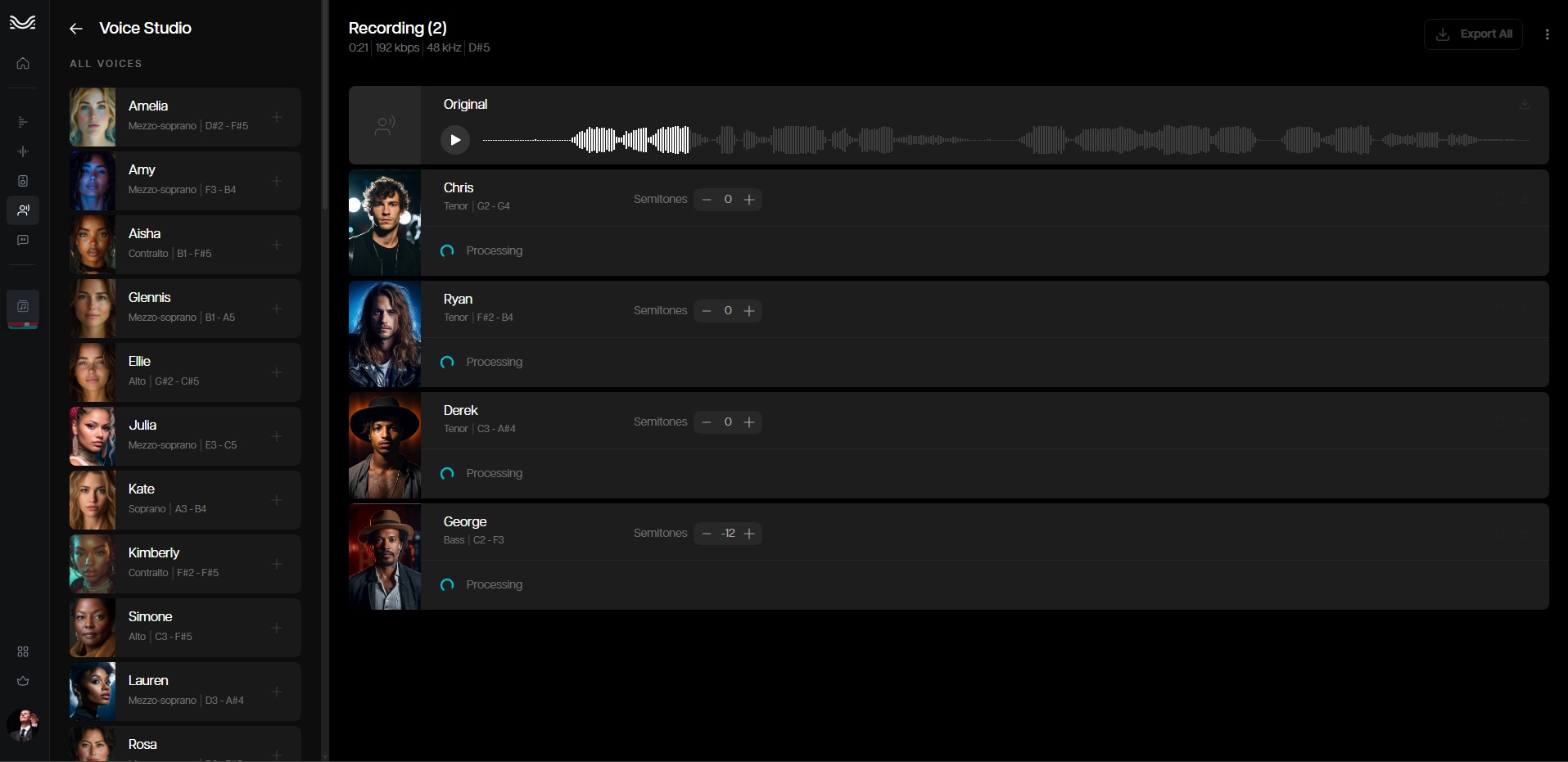
I created a short vocal line for an upcoming concert, using AI to emulate my vocal line (you can change the pitch, gender and manipulate a range of features). Here is the opening portion of that piece:
I simply sang out my vocal line, uploaded it to Moises and then had a range of AI vocal options that I could use to “sing it” for me. You will need to head to “Voice Studio” to access these options.
For more on Moises, specifically on track separation with Moises, you may refer to the overview on this site (click HERE).
I then used this “clean” version of the vocal track and uploaded it to Songscription (as indicated for the best results) to determine the degree of accuracy.

The transcription is not particularly accurate. The AI was unclear about basic rhythmic aspects, and there are a number of time signature changes, presumably as a result of this.
Interestingly, the software generates “likely” backing chords to accompany this singular track, generating Gm, Cm and F in this opening portion.
Nevertheless, there are certainly benefits to the use of this software. It has the ability to assist students who work better from scores.
Here are some practical uses for the software:
1.
Songscription could convert traditional global folk music, jazz solos, or oral traditions into sheet music, MusicXML, or even chord symbols. IB subject reports emphasise (May 2025, for example, see HERE) that students investigating non-notated repertoire should provide brief score excerpts (likely in need of editing) rather than relying solely on descriptive commentary. By transcribing specific melodic or rhythmic motifs from a recorded stimulus, students can easily annotate and embed score snippets into their research portfolios.
2.
Songscription’s multi-instrument transcription feature separates full audio recordings into distinct instrument stems. In the Experimenting with Music component, this allows creators and (potentially) performers to dissect dense audio textures and identify the source material they intend to manipulate. Visualising how individual musical layers function within a track helps students make informed decisions when adapting, arranging, or transforming stimuli for their creating and performing experiments.
3.
All created works submitted in Presenting Music, including DAW compositions, acoustic pieces, and improvisations, must be accompanied by a score or visual representation in the Programme Notes. A standard form of Western notation could assist in offering additional clarification to the details of created works that may not be so readily apparent from a DAW screenshot.
4.
When preparing a performed adaptation for Exploring Music in Context, students must adapt a stimulus for their specific instrument while respecting stylistic conventions. Songscription facilitates this by generating instrument-specific tabs, chord symbols, and difficulty-adjusted piano layouts directly from recorded music. This may enable students to analyse complex recorded passages, transpose lines to suit their instrument’s range, and plan an idiomatic performance practice.
Remember that the use of this software needs to be duly acknowledged in the process.
5.
Because AI transcription tools are likely not to be completely accurate, engaging with Songscription provides valuable ear-training work. Students should compare the AI-generated score against the original audio source to identify, correct, and annotate errors within their Music Journal (see HERE for more on the use of the journal). This process sharpens analytical listening while ensuring AI is used ethically as an investigative aid in line with IB academic integrity standards (see HERE for more on the standards and a student activity).

When used ethically and in accordance with the IB’s principles of academic integrity, these AI tools can serve as powerful allies in inspiring both students and teachers to create innovative and critically evaluated work.
It is imperative that educators diligently monitor the use of AI-generated content and ensure students adhere to established ethical standards. This includes the appropriate acknowledgement of such material, especially in the context of assessments. For music-specific guidance, please refer to page 35 of the Guide.
“Ethical Use” Photo by Marija Zaric on Unsplash
The tools should only be used to support the learning and creative process within the IBDP music programme, not replace it.