Using the site

A brief introduction to the website and how to navigate all the resources.
Starting in the summer of 2026, this website was split into two parts: Teacher-only pages and Student access pages. You can switch between these using the menu bar near the top of the screen. You can control which student access pages are visible to your students; students can never see the teacher-only pages.
Teacher-only pages include:
- Teach pages for each sub-topic that include teaching advice, slides, simulations, and more
- Our Unit planners for each topic
- A description of how to run the Scientific investigation
- Materials for the External assessment including our mock exams
- and much, much more
Student access pages include:
- The interactive eBook, including practice questions and teacher-assigned MCQs, problems, and tests
- 74 practical Activities organized by theme
- A student guide to the Scientific Investigation
- Our Exam preparation guide for students
- and much, much more
Here's a screenshot from an example of a student page, followed by a description of the functionality available to you as a teacher:
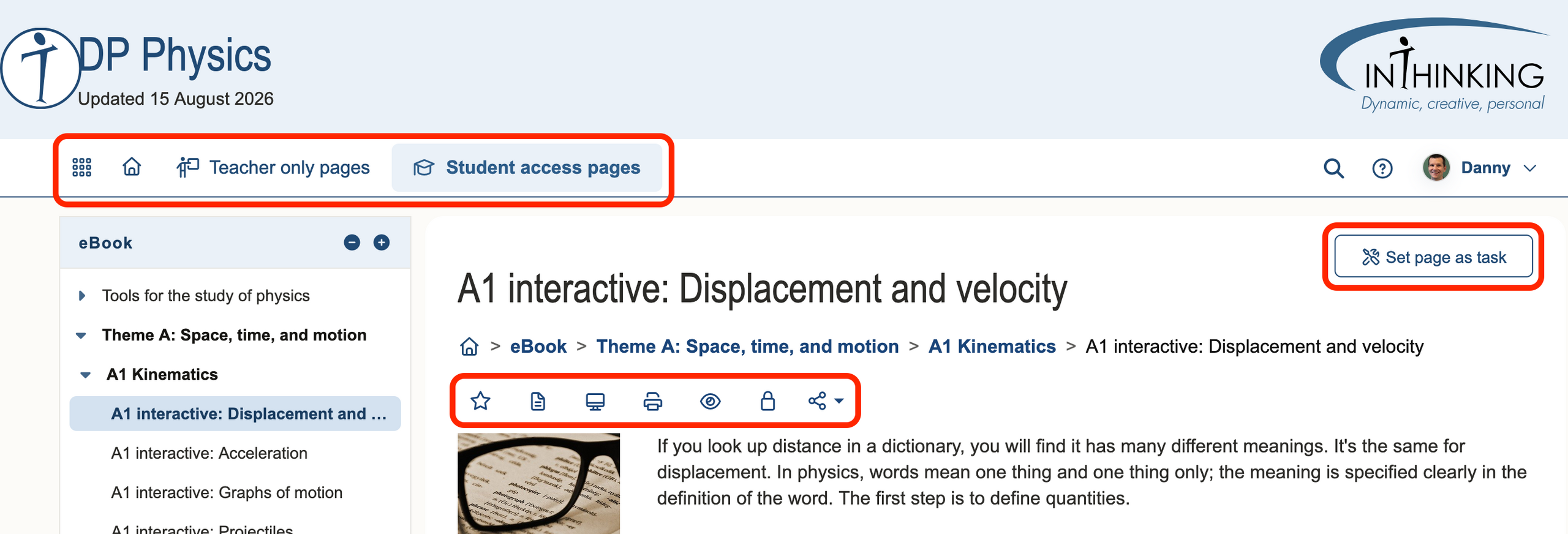
Menu bar
- The “waffle” menu (9 dots) provides shortcuts to the student access manager, your favourites, and more.
- The home icon takes you to the homepage
- Teacher only pages “mega-menu”
- Student access pages “mega-menu”
Tools bar
Located below the title and breadcrumb navigation for each student page, this allows you to:
- Mark a page as a favourite (like a bookmark for the website)
- Add personal notes to the top of the page
- Change to full-screen presentation mode
- Print the page
- View the page as a student
- Change access to this page for your students (after you have set up student access)
- Share the page via social media
One other option, at the top right, is to Set page as task (after you have set up student access). This assigns the page to students from one of your classes: either a quiz, written task, or reading task, depending on the content of the page.
For more information on how students navigate the website and use the interactive eBook, check out the student Navigating the website page.
If you're ready to set up access for your students, head over to our Student access guide.
If you're new to IB Physics, our Introduction to IB Physics page is for you.
And if you're familiar with the site, why not try making your own assignments with the qBank?