A 1.3.1-1.3.5 Operating Systems

A 1.3 Operating Systems and Control Systems
Every program you run depends on a layer of software you almost never see. The operating system sits between your applications and the hardware, deciding which program runs next, where files are kept, and how each device is reached, while hiding the hardware detail that would otherwise make every program far harder to write. These five statements build on each other: they start with what the operating system is for, move through the functions it performs, and then look closely at two decisions it makes constantly, how to schedule work and how to notice when a device needs attention. The higher level statement extends this to how one machine juggles many tasks at once and what goes wrong when those tasks compete for the same resources.
Last Updated: 18 July 2026
Key Questions
- What does it actually mean to say an operating system abstracts the hardware?
- Which functions must an operating system carry out, and what does each one achieve?
- How do the four scheduling approaches differ, and when does each suit a workload?
- When is interrupt handling the better choice than polling, and when can polling be justified?
- (HL) Why does running many tasks create contention for resources, how does that lead to deadlock, and how can the operating system prevent it?
IB Command Terms note
This page spans four command terms, and they ask for different things.
- Describe (1.3.1, 1.3.2): give a detailed account. For the functions, naming them is not enough; say what each one does.
- Compare (1.3.3): give an account of similarities and differences, holding the approaches side by side. An answer that describes each algorithm in turn without ever comparing them does not meet the command term.
- Evaluate (1.3.4): weigh strengths against limitations and reach a judgement. This is the most demanding term here. Listing the pros and cons of polling and interrupts earns some credit; deciding which is better for a stated situation, and saying why, is what "evaluate" requires.
- Explain (1.3.5, HL): give a detailed account including reasons and causes. Say why multitasking creates the problems it does, not just that it does.
A1.3.1 What is the role of an operating system?
Two ideas sit at the centre of this statement, and they are connected.
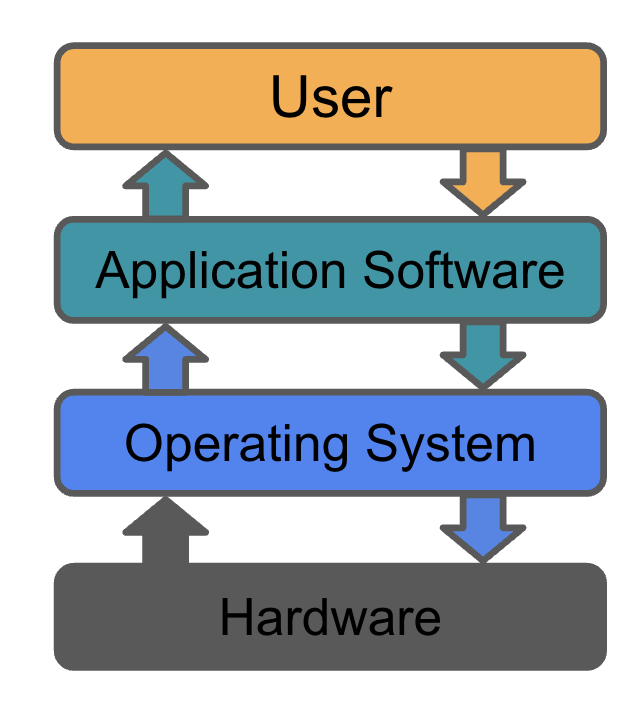
The operating system manages the system's resources. The processor, main memory and storage are all finite, and several programs usually want them at the same time. The operating system decides which process gets the processor and for how long, hands out memory and reclaims it, and tracks where every file sits on disk. Without these decisions, two programs writing to the same memory or the same file would corrupt each other within seconds.
It does this by abstracting the hardware. A program that wants to read a file does not issue the precise electrical commands a particular disk controller expects. It asks the operating system to open a file, and the operating system translates that request into whatever the specific hardware needs. The same program then runs on a machine with a completely different disk, because the messy, device specific part is the operating system's problem, not the program's. Programs are written once against a simple, uniform interface instead of against every possible piece of hardware.
A1.3.2 What functions does an operating system perform?
Much of the operating system's work happens in the background while you do something else. It moves pages of memory between RAM and disk, writes log entries, updates the scheduler's queues and checks permissions, all without any prompt from you.
The point of this constant background activity is to maintain system integrity: to keep the system in a consistent, stable state. The syllabus names nine functions through which it does this. Each is summarised below.
A1.3.3 How do the approaches to scheduling differ?
When several processes are ready at once, only one can use the processor at a time, so the operating system has to choose an order. This changes how long users wait, how evenly work is shared, and how much time is lost switching between tasks. The aim is to allocate processor time so as to get the best performance for the hardware being used.
THINK FIRST
Three programs all want the processor at the same instant: a long video export, a text editor waiting for keystrokes, and a background backup. Before reading on, decide what order you would run them in, and be honest about what "fair" should mean. Most disagreements about scheduling are really disagreements about that word.
The syllabus names four approaches.
First-come first-served (FCFS) runs processes to completion in the order they arrive. It is simple and predictable. Its weakness is the convoy effect: one long job at the front of the queue holds up every short job behind it, pushing up the average waiting time.
Round robin gives each process a fixed time slice, the quantum, then moves it to the back of the queue and starts the next. No process is left waiting indefinitely, which makes the system feel responsive. The cost is the overhead of switching between processes many times a second, and the quantum has to be chosen with care: too short and switching dominates, too long and it behaves like FCFS.
Multilevel queue scheduling splits processes into separate queues, typically by type or priority, and gives each queue its own rule. Interactive work might sit in a high queue served quickly, while background work waits in a lower queue. This treats different work appropriately, but itis more complex and the risk that a low priority queue is ignored while the higher priority ones stay busy.
Priority scheduling runs the highest priority ready process first. This suits real-time and urgent work, where some tasks genuinely must run before others. Its danger is that a low priority process may never run while higher priority work keeps arriving, unless the system gradually raises the priority of processes that have waited a long time.
Remember for A1.3.3 you must be able to compare. Notice that no approach is best in every way.
| Approach | How processor time is allocated | Main strength | Main limitation |
|---|---|---|---|
| First-come first-served | In arrival order, each process runs to completion | Simple and predictable | Convoy effect: a long job delays all jobs behind it |
| Round robin | Fixed time slice each, then rotate to the back of the queue | Responsive; no process is starved | Frequent context switching adds overhead |
| Multilevel queue | Processes split into queues by type or priority, each queue with its own rule | Different work gets suitable treatment | Lower queues can starve; more complex to manage |
| Priority scheduling | Highest priority ready process runs first | Urgent and real-time work served first | Low priority processes can starve without ageing |
COMMON EXAM MISTAKE
In a "compare" question, candidates often write a paragraph on each algorithm and stop there. That is four descriptions, not a comparison. Pull them together explicitly: say which is more responsive, which carries more overhead, which can cause starvation. The comparison is the bit that scores on this command term.
A1.3.4 Should the system use polling or interrupt handling?
The operating system has to know when a device, such as a keyboard or a network card, has data ready or has finished a job. There are two ways to find out.
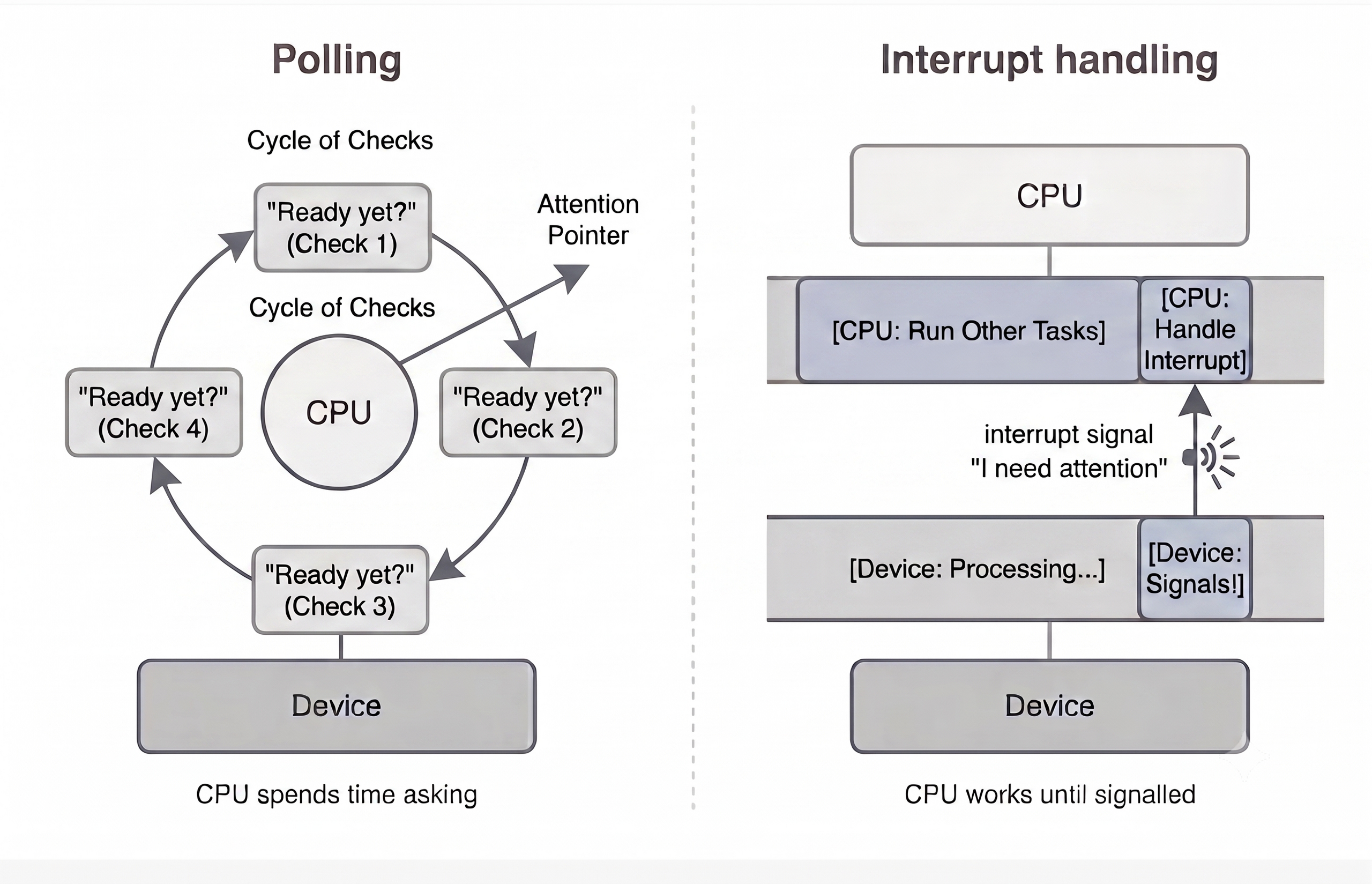
With polling, the processor repeatedly checks the device and keeps asking if it is ready yet. This is a simple task, but the processor spends time asking even when the answer is almost always no.
With interrupt handling, the device sends a signal, an interrupt, when it needs attention. The processor gets on with other work and responds only when the signal arrives. It then saves what it was doing, runs a short interrupt handler, and resumes.
Deciding between them is the "evaluate" part of this statement, and the syllabus lists six considerations that help decide the best approach.
EXAM TIP
"Evaluate" wants a judgement, so apply the considerations to the situation in the question and commit to an answer. Take a keyboard on a battery laptop: keystrokes are infrequent and unpredictable, so polling would burn power checking an idle device, while interrupts let the processor sleep and still respond instantly. The judgement is clear, interrupts win here, and the considerations are your reasons. Contrast that with a busy network card receiving a continuous, predictable stream of packets, where constant interrupts could swamp the processor and periodic polling may actually be more efficient. The same six factors, a different answer, because the situation differs.
A1.3.5 How does the operating system manage multitasking and resource allocation? (HL only)
This statement is higher level only.
A typical processor core does one thing at a time, yet your machine appears to run a browser, a music player and a download at once. This illusion of parallelism comes from the operating system switching between tasks many times a second, giving each a short turn. For each switch the system saves the running task’s state (its registers, memory pointers and open files) and restores the next task’s. This switching is pure overhead, and doing too much of it wastes the processor it is meant to share.
To keep all this progressing, the operating system acts as the coordinator for every resource: processor time, memory and the input/output devices. Three challenges make that hard.
Task scheduling. With many tasks competing, the system must keep choosing which runs next, using the kinds of approach from A1.3.3. Good scheduling keeps interactive tasks responsive without starving background work.
Resource contention. Two or more tasks often want the same resource, a region of memory, a file, a device, at the same time. The operating system has to arbitrate, which means some tasks wait. Poorly handled, contention causes long delays or lets a high priority task get stuck behind a lower one that holds something it needs.
Deadlock. Contention can reach a state where progress stops entirely. Suppose process P1 holds resource R1 and asks for R2, while P2 holds R2 and asks for R1. Each waits for the other to release what it holds, and neither ever will. This is a circular wait, and it is the classic cause of deadlock.
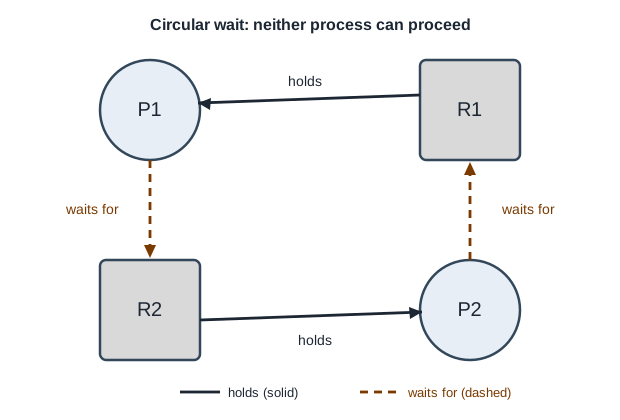
Deadlock can occur only when four conditions hold at the same time: mutual exclusion (a resource cannot be shared), hold and wait (a process holds one resource while waiting for another), no preemption (a resource cannot be forcibly taken back) and circular wait (the loop above). Because all four are required together, the operating system can prevent deadlock by denying any one of them.
THINK FIRST
Take each of the four conditions in turn. If the operating system could stop that one condition from ever holding, would P1 and P2 still get stuck? Decide before reading on, and think about what it would cost the system to stop it.
Preventing deadlock
Each condition can be denied. Each works for the same reason, because the deadlock needs all four. They differ in how practical they are.
Mutual exclusion. The operating system makes the resource shareable. A read-only file can be read by many processes at once, and print jobs can be spooled so that only the spooler ever holds the printer. No process then waits for a resource another holds. The limitation is that many resources cannot be shared, such as a file being written to.
Hold and wait. A process must request every resource it needs at once, and gets all of them or none. Alternatively, it must release what it holds before asking for more. No process is then holding one resource while waiting for another. The cost is that resources sit allocated but unused, and a process that needs several popular resources may wait a long time.
No preemption. If a process holding resources asks for one it cannot have, the operating system takes back what it holds, and the process tries again later. P1 can no longer keep R1 forever, so P2 eventually gets it. This only works for resources whose state can be saved and restored, such as the processor or memory, in the same way a context switch saves a task’s state. A printer halfway through a page cannot be taken back.
Circular wait. The operating system imposes resource ordering: resources must be requested in a fixed order, R1 before R2. P1 and P2 must both ask for R1 first. Whichever gets it can then get R2, while the other waits holding nothing. No process ever holds R2 while waiting for R1, so the loop cannot form.
Resource ordering is the method used most often. The other three are often impossible or expensive, while a fixed order is cheap to impose and works for any resource.
SCOPE NOTE
Everything above is prevention: the system is set up so the loop never forms. Clearing a deadlock that has already happened, for example by ending one of the processes, is a separate problem and is not part of this statement.
COMMON EXAM MISTAKE
Students often say multitasking means the processor runs programs “at the same time”. On a single core it does not. It switches between them fast enough to look simultaneous, and that switching is why context switching has a cost. Contention and deadlock are a separate matter. They come from tasks sharing resources that only one can hold at a time, which happens on one core or on many.
SUMMARY
Use this summary to help you revise and remember the key points once you have understood all the detail above.
TRY IT ON PAPER
The questions below need written answers. Attempt them on paper (or a laptop if you use one in the exam) before opening the model answers.
- Compare first-come first-served and round robin scheduling. [4 marks]
- Both are processor scheduling algorithms that decide the order in which ready processes use the processor [1].
- Under FCFS a process runs until it finishes, whereas under round robin a process runs only for a fixed time slice before being moved to the back of the queue [1].
- As a result FCFS can make short processes wait behind a long one (the convoy effect), while round robin shares the processor more evenly so short processes respond sooner [1].
- Round robin pays for this with the overhead of frequent context switching, which FCFS largely avoids [1].
2. Evaluate the use of polling and interrupt handling for taking input from a keyboard on a battery-powered laptop. [6 marks]
- Keystrokes are infrequent and unpredictable: a user may type nothing for minutes, then a burst [1].
- Polling would make the processor check the keyboard repeatedly even when no key is pressed, wasting cycles [1].
- On a battery device that wasted activity drains charge, because the processor cannot drop into a low power state [1].
- Interrupt handling lets the processor sleep or do other work until a key is actually pressed [1].
- The response latency to a single keystroke is low with interrupts, which keeps the keyboard feeling responsive [1].
- Judgement: interrupt handling is the better choice here; its only real cost, the overhead per interrupt, is negligible at typing speeds, so it wins on power use, overhead and responsiveness [1].
3. (HL) Explain how deadlock can arise when two processes share resources. [4 marks]
- Deadlock occurs when two or more processes are each holding a resource and each waiting for a resource the other holds, so none can proceed [1].
- For example, P1 holds R1 and requests R2, while P2 holds R2 and requests R1 [1].
- Neither releases what it holds until it gets what it wants, so both wait indefinitely; this is the circular wait [1].
- It can occur only when mutual exclusion, hold and wait, no preemption and circular wait all hold together, so removing any one prevents it [1].
Operating system Quiz
Which of the following is NOT a core function of an operating system?
What is the purpose of abstraction in an operating system?
Which scheduling algorithm gives each process a fixed time slice on the CPU?
What is a device driver?
Which of the following is an advantage of virtualization?
What is the main difference between polling and interrupt handling?
Which of the following is NOT a factor that influences the choice between polling and interrupts?
What is deadlock?
Which of the following is a strategy for preventing deadlock?
What is the role of a transducer in a control system?