<turbo-stream action="append" target="section-items">
    <template>
            <a href="/computerscience/page/58621/a-114-primary-memory" class="card text-body rounded-0 text-decoration-none" data-turbo-frame="_top" data-turbo="false">
        <div class="card-body">
            <div class="row align-items-start gx-3">
                <div class="col-4 col-lg-3">
                    <div class="rounded overflow-hidden hover-zoom hover-overlay">
        <img
            class="d-block w-100 height-150 object-cover"
            src="https://teacher-sites-storage.inthinking.net/ib/computerscience/2025/theme-a--concepts-of-computer-science/a1-computer-fundamentals/a1.1-computer-hardware-and-operation/ram.jpg"
            alt="A 1.1.4 Primary Memory"
        >
    </div>

                </div>
                <div class="col-8 col-lg-9">
                                            <h6 class="text-accent">
                            Teacher Resources (new)
                        </h6>
                                        <h5 class="fw-semibold text-primary mb-2 d-flex gap-1 align-items-end">
                        A 1.1.4 Primary Memory
                                    

                    </h5>
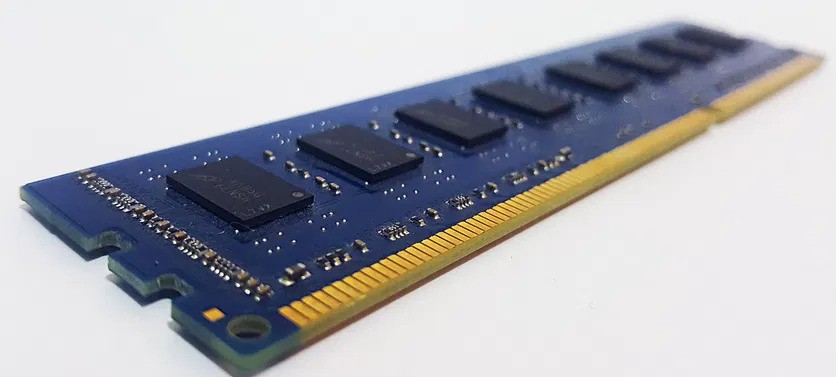
                                            <p class="text-body mb-0 mb-lg-3"> To function efficiently, computer systems rely on primary memory components, including RAM, ROM, cache, and registers. RAM stores active data and programs, ROM holds essential system instructions, and...</p>
                                        <div class="clearfix">
                        <span class="text-muted fs-sm float-end">
                            10 September 2026
                        </span>
                    </div>
                </div>
            </div>
        </div>
    </a>
    <a href="/computerscience/page/58617/a-111-cpu" class="card text-body rounded-0 text-decoration-none" data-turbo-frame="_top" data-turbo="false">
        <div class="card-body">
            <div class="row align-items-start gx-3">
                <div class="col-4 col-lg-3">
                    <div class="rounded overflow-hidden hover-zoom hover-overlay">
        <img
            class="d-block w-100 height-150 object-cover"
            src="https://teacher-sites-storage.inthinking.net/ib/computerscience/2025/theme-a--concepts-of-computer-science/a1-computer-fundamentals/a1.1-computer-hardware-and-operation/multicoreprocessor.jpg"
            alt="A 1.1.1 CPU"
        >
    </div>

                </div>
                <div class="col-8 col-lg-9">
                                            <h6 class="text-accent">
                            Teacher Resources (new)
                        </h6>
                                        <h5 class="fw-semibold text-primary mb-2 d-flex gap-1 align-items-end">
                        A 1.1.1 CPU
                                    

                    </h5>
                                            <p class="text-body mb-0 mb-lg-3"> The Central Processing Unit (CPU) is the heart of a computer, responsible for executing instructions and processing data. It comprises several key components, each playing a crucial role in its operation....</p>
                                        <div class="clearfix">
                        <span class="text-muted fs-sm float-end">
                            10 September 2026
                        </span>
                    </div>
                </div>
            </div>
        </div>
    </a>
    <a href="/computerscience/page/69722/a-114-worksheet" class="card text-body rounded-0 text-decoration-none" data-turbo-frame="_top" data-turbo="false">
        <div class="card-body">
            <div class="row align-items-start gx-3">
                <div class="col-4 col-lg-3">
                    <div class="rounded overflow-hidden hover-zoom hover-overlay">
        <img
            class="d-block w-100 height-150 object-cover"
            src="https://teacher-sites-storage.inthinking.net/subject/generic/44/02.jpg?v=1790338362"
            alt="A 1.1.4 Worksheet"
        >
    </div>

                </div>
                <div class="col-8 col-lg-9">
                                            <h6 class="text-accent">
                            Activities
                        </h6>
                                        <h5 class="fw-semibold text-primary mb-2 d-flex gap-1 align-items-end">
                        A 1.1.4 Worksheet
                                    

                    </h5>
                                            <p class="text-body mb-0 mb-lg-3"> Name: ............................................  Class: ..................  Date: .............. Work through this sheet as the lesson progresses. Write in full sentences where asked. Part 1: Do Now...</p>
                                        <div class="clearfix">
                        <span class="text-muted fs-sm float-end">
                            09 September 2026
                        </span>
                    </div>
                </div>
            </div>
        </div>
    </a>
    <a href="/computerscience/page/68831/a-115a-worksheet" class="card text-body rounded-0 text-decoration-none" data-turbo-frame="_top" data-turbo="false">
        <div class="card-body">
            <div class="row align-items-start gx-3">
                <div class="col-4 col-lg-3">
                    <div class="rounded overflow-hidden hover-zoom hover-overlay">
        <img
            class="d-block w-100 height-150 object-cover"
            src="https://teacher-sites-storage.inthinking.net/subject/generic/44/03.jpg?v=1790338362"
            alt="A 1.1.5a Worksheet"
        >
    </div>

                </div>
                <div class="col-8 col-lg-9">
                                            <h6 class="text-accent">
                            Activities
                        </h6>
                                        <h5 class="fw-semibold text-primary mb-2 d-flex gap-1 align-items-end">
                        A 1.1.5a Worksheet
                                    

                    </h5>
                                            <p class="text-body mb-0 mb-lg-3"> Name:  Class: You complete Part 1 at the simulator. You complete Parts 2 to 4 after the class has gone through the stages together. Part 1: Investigation capture Open the simulator, select "Add two numbers",...</p>
                                        <div class="clearfix">
                        <span class="text-muted fs-sm float-end">
                            07 September 2026
                        </span>
                    </div>
                </div>
            </div>
        </div>
    </a>
    <a href="/computerscience/page/60567/a1-computer-fundamentals" class="card text-body rounded-0 text-decoration-none" data-turbo-frame="_top" data-turbo="false">
        <div class="card-body">
            <div class="row align-items-start gx-3">
                <div class="col-4 col-lg-3">
                    <div class="rounded overflow-hidden hover-zoom hover-overlay">
        <img
            class="d-block w-100 height-150 object-cover"
            src="https://teacher-sites-storage.inthinking.net/ib/computerscience/2025/theme-a--concepts-of-computer-science/a1-computer-fundamentals/futurecomp.jpeg"
            alt="A1 Computer Fundamentals"
        >
    </div>

                </div>
                <div class="col-8 col-lg-9">
                                            <h6 class="text-accent">
                            Teacher Resources (new)
                        </h6>
                                        <h5 class="fw-semibold text-primary mb-2 d-flex gap-1 align-items-end">
                        A1 Computer Fundamentals
                                    

                    </h5>
                                            <p class="text-body mb-0 mb-lg-3"> A1 Computer Fundamentals covers the inner workings of a computer, from the hardware that runs instructions to the software that manages it. It spans computer hardware and operation, data representation...</p>
                                        <div class="clearfix">
                        <span class="text-muted fs-sm float-end">
                            07 September 2026
                        </span>
                    </div>
                </div>
            </div>
        </div>
    </a>
    <a href="/computerscience/page/72013/building-your-ia" class="card text-body rounded-0 text-decoration-none" data-turbo-frame="_top" data-turbo="false">
        <div class="card-body">
            <div class="row align-items-start gx-3">
                <div class="col-4 col-lg-3">
                    <div class="rounded overflow-hidden hover-zoom hover-overlay">
        <img
            class="d-block w-100 height-150 object-cover"
            src="https://teacher-sites-storage.inthinking.net/ib/computerscience/2025/worksheets/ia/databases.jpeg"
            alt="Building your IA"
        >
    </div>

                </div>
                <div class="col-8 col-lg-9">
                                            <h6 class="text-accent">
                            Activities
                        </h6>
                                        <h5 class="fw-semibold text-primary mb-2 d-flex gap-1 align-items-end">
                        Building your IA
                                    

                    </h5>
                                            <p class="text-body mb-0 mb-lg-3"> Worked tutorials for the technical skills your IA product needs. Follow one from start to finish, then build your own for your own client. These tutorials teach the main techniques you need to build the...</p>
                                        <div class="clearfix">
                        <span class="text-muted fs-sm float-end">
                            07 September 2026
                        </span>
                    </div>
                </div>
            </div>
        </div>
    </a>
    <a href="/computerscience/page/72028/testing-against-your-success-criteria" class="card text-body rounded-0 text-decoration-none" data-turbo-frame="_top" data-turbo="false">
        <div class="card-body">
            <div class="row align-items-start gx-3">
                <div class="col-4 col-lg-3">
                    <div class="rounded overflow-hidden hover-zoom hover-overlay">
        <img
            class="d-block w-100 height-150 object-cover"
            src="https://teacher-sites-storage.inthinking.net/subject/generic/44/04.jpg?v=1790338362"
            alt="Testing against your success criteria"
        >
    </div>

                </div>
                <div class="col-8 col-lg-9">
                                            <h6 class="text-accent">
                            Activities
                        </h6>
                                        <h5 class="fw-semibold text-primary mb-2 d-flex gap-1 align-items-end">
                        Testing against your success criteria
                                    

                    </h5>
                                            <p class="text-body mb-0 mb-lg-3"> A product is only finished when it does what the client needed, and you have to show that it does. That is what testing is for. It is not a tidy-up at the end. It runs alongside development from the first...</p>
                                        <div class="clearfix">
                        <span class="text-muted fs-sm float-end">
                            06 September 2026
                        </span>
                    </div>
                </div>
            </div>
        </div>
    </a>
    <a href="/computerscience/page/72027/designing-your-data" class="card text-body rounded-0 text-decoration-none" data-turbo-frame="_top" data-turbo="false">
        <div class="card-body">
            <div class="row align-items-start gx-3">
                <div class="col-4 col-lg-3">
                    <div class="rounded overflow-hidden hover-zoom hover-overlay">
        <img
            class="d-block w-100 height-150 object-cover"
            src="https://teacher-sites-storage.inthinking.net/ib/computerscience/2025/worksheets/ia/erd.png"
            alt="Designing your data"
        >
    </div>

                </div>
                <div class="col-8 col-lg-9">
                                            <h6 class="text-accent">
                            Activities
                        </h6>
                                        <h5 class="fw-semibold text-primary mb-2 d-flex gap-1 align-items-end">
                        Designing your data
                                    

                    </h5>
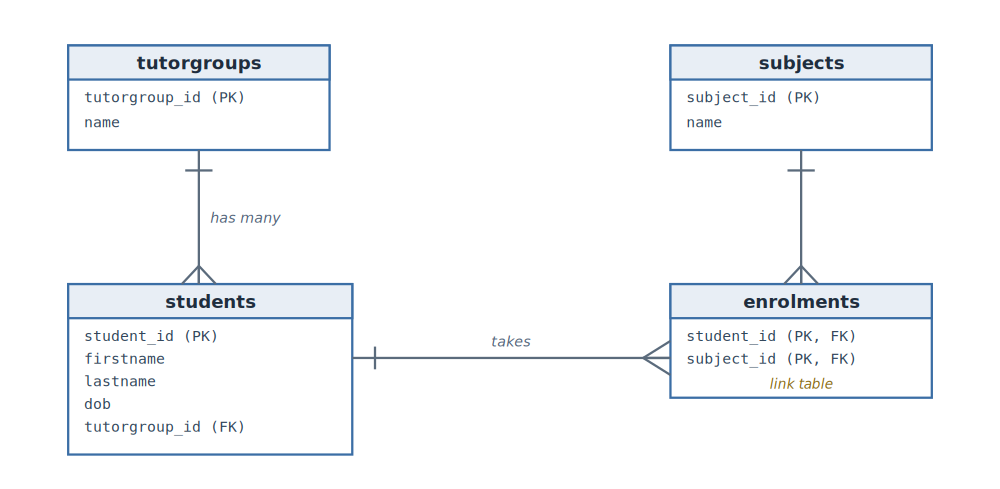
                                            <p class="text-body mb-0 mb-lg-3"> Before you write any code, work out what data the product holds and how the pieces fit together. Ten minutes with a pencil here saves hours of rewriting later, because the shape of the data decides the...</p>
                                        <div class="clearfix">
                        <span class="text-muted fs-sm float-end">
                            06 September 2026
                        </span>
                    </div>
                </div>
            </div>
        </div>
    </a>
    <a href="/computerscience/page/72031/building-a-tkinter-and-sqlite-crud-app" class="card text-body rounded-0 text-decoration-none" data-turbo-frame="_top" data-turbo="false">
        <div class="card-body">
            <div class="row align-items-start gx-3">
                <div class="col-4 col-lg-3">
                    <div class="rounded overflow-hidden hover-zoom hover-overlay">
        <img
            class="d-block w-100 height-150 object-cover"
            src="https://teacher-sites-storage.inthinking.net/ib/computerscience/2025/worksheets/ia/tk-app-final.png"
            alt="Building a Tkinter and SQLite CRUD app"
        >
    </div>

                </div>
                <div class="col-8 col-lg-9">
                                            <h6 class="text-accent">
                            Activities
                        </h6>
                                        <h5 class="fw-semibold text-primary mb-2 d-flex gap-1 align-items-end">
                        Building a Tkinter and SQLite CRUD app
                                    

                    </h5>
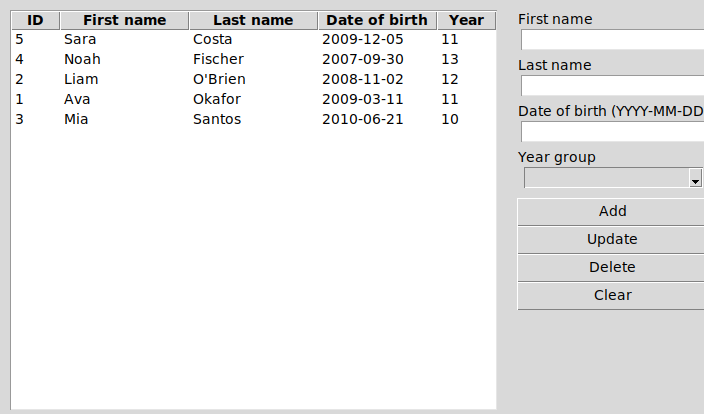
                                            <p class="text-body mb-0 mb-lg-3"> This is the Python version of the database app built in the JavaFX tutorial. It stores students in a SQLite database and lets you add, edit and delete them on screen, with a table of everyone on the left...</p>
                                        <div class="clearfix">
                        <span class="text-muted fs-sm float-end">
                            06 September 2026
                        </span>
                    </div>
                </div>
            </div>
        </div>
    </a>
    <a href="/computerscience/page/72016/reading-and-writing-files-in-python" class="card text-body rounded-0 text-decoration-none" data-turbo-frame="_top" data-turbo="false">
        <div class="card-body">
            <div class="row align-items-start gx-3">
                <div class="col-4 col-lg-3">
                    <div class="rounded overflow-hidden hover-zoom hover-overlay">
        <img
            class="d-block w-100 height-150 object-cover"
            src="https://teacher-sites-storage.inthinking.net/subject/generic/44/01.jpg?v=1790338362"
            alt="Reading and writing files in Python"
        >
    </div>

                </div>
                <div class="col-8 col-lg-9">
                                            <h6 class="text-accent">
                            Activities
                        </h6>
                                        <h5 class="fw-semibold text-primary mb-2 d-flex gap-1 align-items-end">
                        Reading and writing files in Python
                                    

                    </h5>
                                            <p class="text-body mb-0 mb-lg-3"> Most IA products need to keep their data somewhere. A program holds its data in memory while it runs, but memory is emptied the moment the program closes. To keep data between runs, or to take data in...</p>
                                        <div class="clearfix">
                        <span class="text-muted fs-sm float-end">
                            06 September 2026
                        </span>
                    </div>
                </div>
            </div>
        </div>
    </a>


    </template>
</turbo-stream>

    <turbo-stream action="update" target="load-more">
        <template>
            <div class="d-flex justify-content-center my-3">
    <a href="/computerscience/latest-updates?page=11" class="btn btn-secondary loader">
        <i class="fa-regular fa-circle-plus"></i>
        Load more
    </a>
    <div class="spinner-border load-more text-primary" role="status">
        <span class="visually-hidden">Loading...</span>
    </div>
</div>

        </template>
    </turbo-stream>